

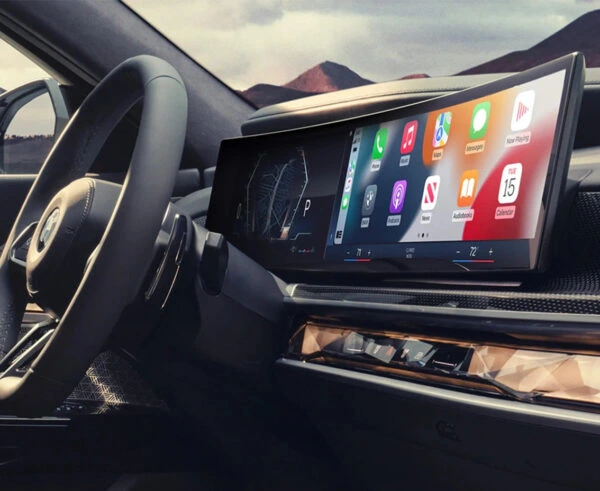
BMW 2 Series F44 / G42 / G87 iDrive 8 Mileage Blocker
Enter the coupon code at checkout to apply your discount.
For off-road, testings, dyno and development use only.
Overview
The BMW 2 Series iDrive 8 mileage blocker is a plug-in electronic module designed for compatible F44, G42 and G87 vehicles equipped with BMW’s Curved Display.
It controls new mileage recording through selectable operating settings while leaving previously stored mileage unchanged. The module connects using matching vehicle plugs without cutting or soldering the original wiring.
This curved-screen version uses a connection behind the lower dashboard trim rather than directly behind the instrument display.
Compatibility
The Smelecom BMW 2 Series mileage blocker is listed for:
- BMW 2 Series Gran Coupé F44
- BMW 2 Series Coupé G42
- BMW M2 G87
- Model years: 2023 onwards
- Compatible iDrive 8 / Curved Display configuration
- Vehicles matching the dashboard shown in the product images
The chassis code and production year alone do not confirm fitment. The vehicle must also have the specified instrument-display and connector configuration.
BMW models with earlier dashboard versions may require a different module from the BMW mileage blocker range.
If you are uncertain about compatibility, contact Smelecom with your VIN, model year and a clear dashboard photograph before ordering.
Key Features
- Vehicle-specific design: Developed for supported BMW F44, G42 and G87 iDrive 8 applications.
- Plug-and-play installation: Connects using compatible plugs without modifying the factory wiring.
- OEM-style connectors: Provides matching connections for the specified vehicle configuration.
- Four operating settings: Allows different mileage-recording modes, including normal operation.
- BC-button control: Uses the vehicle’s existing button to change operating modes.
- Last-setting memory: Retains the previous operating setting where supported.
- Removable design: Can be disconnected without permanent wiring modifications.
- Vehicle functionality: The product information states that the speedometer and driver-assistance systems remain operational when correctly installed.
How Does the BMW 2 Series Mileage Blocker Work?
The module connects to the BMW’s electronic system and regulates newly recorded distance according to the selected operating setting.
It does not erase or reverse mileage already stored in the vehicle. When the normal mode is selected, standard distance recording resumes.
The module uses emergency-flasher signals to confirm operating-mode changes, with an additional buzzer indication for filtered mileage stored by its system.
Quality and Testing
Each unit is prepared and checked for its specified BMW application before dispatch.
The kit includes installation instructions covering the iDrive 8 connection arrangement. Professional fitting is recommended for anyone unfamiliar with vehicle electronics.
General fitting precautions are available in Smelecom’s mileage blocker installation guide.
Shipping and Availability
- UK and worldwide shipping available.
- Most in-stock orders are dispatched the same day.
- Next-working-day UK delivery may be available for eligible orders.
- International delivery services depend on the destination.
Shipping conditions and return arrangements are detailed in the delivery and returns policy.
Vehicle-Specific Guidance
The BMW 2 Series iDrive 8 module requires access to the white plug behind the lower guard or dashboard trim panel. The Curved Display itself does not need to be removed.
The supplied fitting images should be used to identify the correct connector before installation. Earlier BMW instrument-cluster arrangements may use a different connection point.
Installation
Follow the vehicle-specific fitting instructions supplied with the module.
- Switch off the BMW and allow its electrical systems to shut down.
- Remove the lower guard or dashboard trim panel identified in the fitting guide.
- Locate and disconnect the original white plug.
- Attach the module plugs to the matching vehicle-side connections.
- Connect the vehicle’s original white plug to the corresponding module connector.
- Check that all plugs are correctly aligned and fully seated.
- Secure the wiring against pinching or strain, then refit the trim.
- Close all doors and lock the vehicle for approximately two minutes.
- Unlock and start the BMW, checking that the display and normal vehicle functions operate correctly.
Important: Never force a connector. Check its orientation and the fitting images if the connection does not seat correctly.
Activation and Operating Modes
The BMW 2 Series iDrive 8 module provides four selectable operating modes.
Mode 1: Mileage Recording Stopped
- Emergency flashers blink twice.
- New mileage recording is stopped.
Mode 2: 10% Mileage Recording
- Emergency flashers blink three times.
- The module records 10% of the distance travelled.
Mode 3: 50% Mileage Recording
- Emergency flashers blink four times.
- Mileage is recorded at 50% of the travelled distance.
Mode 4: Normal Operation
- Emergency flashers blink once.
- Standard mileage recording resumes at 100%.
Activation Sequence
Start the vehicle before changing modes.
Press and hold the BC button for six seconds to advance to the next setting. Repeat the sequence to cycle through the available modes.
To return to normal operation, continue until the emergency flashers blink once, confirming Mode 4.
The module also provides buzzer signals indicating filtered distance stored by its system:
- One signal represents approximately 5,000 km.
- Two signals represent approximately 10,000 km.
- Additional signals indicate further increments of approximately 5,000 km.
Follow the supplied instructions when selecting and confirming operating modes.
Post-Installation Troubleshooting
Close all doors and lock the vehicle for approximately five minutes. Unlock it and check the display again.
Engine Warning Light
The supplied instructions describe a move, stop and switch-off cycle repeated approximately three to five times. If an engine warning appears, have the fault assessed before driving further. A suitable diagnostic tool may be required.
Outside Temperature Shows -40°C
The product guidance describes the same three-to-five-cycle procedure for this temporary reading. If the temperature display remains incorrect, seek diagnostic assistance.
Persistent warning lights or abnormal vehicle behaviour should be checked by a qualified specialist.
Important Information
This module is intended for compatible BMW 2 Series vehicles with the specified iDrive 8 Curved Display configuration. Vouchers cannot be used to purchase curved-screen products.
The customer is responsible for ensuring that installation and use comply with applicable laws and regulations. Any discrepancy between actual distance travelled and recorded mileage must be disclosed where required.
For further questions about vehicle compatibility or fitting requirements, contact the Smelecom team before purchasing.
| Installation | Plug & Play |
|---|---|
| SKU | 1 - BMW Curved |
| Weight | 0.5 kg |
| Package Dimensions | 12 × 10 × 2 cm |
Is it difficult to install?
No. This module is plug-and-play — no cutting, soldering or coding required. Most installs take under 30 minutes.
Will it leave any errors after removal?
No. The module saves the last setting and leaves no error messages or mileage jump after removal.
Is it covered by a warranty?
Yes — every module comes with a 6-month warranty against manufacturing faults, plus our hassle-free 14-day returns. Please note our products are supplied strictly for off-road, testing, dyno and development use only.
 BMW 2 Series F44 / G42 / G87 iDrive 8 Mileage Blocker
You may also like
-
BMW
 2017–2025
BMW X3 Mileage Blocker (G01, 2017+)
£190.00 + VATPlug & Play Mileage Data OBD Ready Secure ChipView Product -
BMW
2017–2020
BMW 1 Series F20/F21 Black Panel Mileage Blocker
£190.00 + VATPlug & Play Mileage Data OBD Ready Secure ChipView Product -
BMW
2019–2025
BMW 1 Series F40 Mileage Blocker
£190.00 + VATPlug & Play Mileage Data OBD Ready Secure ChipView Product -
BMW
 2015–2022
BMW 7 Series Mileage Blocker (G11/G12)
£190.00 + VATPlug & Play Mileage Data OBD Ready Secure ChipView Product



Reviews
There are no reviews yet